
When you apply for a job online, your resume rarely lands directly on a hiring manager’s desk. Before human eyes ever see it, an Applicant Tracking System (ATS) scans, parses, and scores your application. If your resume isn’t optimized for these systems, it could be filtered out automatically — even if you’re the perfect candidate.
An ATS friendly resume is structured and formatted so that automated screening software can read, interpret, and rank it accurately. Companies of all sizes — from startups to Fortune 500 firms — use ATS platforms like Workday, Greenhouse, Lever, and Zoho Recruit to manage hundreds or thousands of applications at once.
Industry estimates suggest that over 70% of resumes are rejected by ATS before a human ever reads them. If your resume isn’t built for these systems, you’re fighting an uphill battle before the process even begins.
Build an ATS Friendly Resume in Just 10 Minutes
Most candidates lose interview opportunities because their resumes fail ATS scans. Salarite helps you create an ATS friendly resume with the right format, keywords, and structure — completely free.
Trusted by thousands of Indian job seekers · No signup needed. No Watermark. Free download
How Does an ATS Actually Work?
Understanding the mechanics behind ATS software helps you optimize your resume more effectively.
1. Parsing: Breaking Down Your Resume
When you upload your resume, the ATS first parses it — extracting text, identifying sections like Work Experience, Education, and Skills, and organizing information into a structured database. Unusual formatting, tables, graphics, or non-standard fonts can cause parsing errors that corrupt your information.
2. Keyword Matching: How Your Resume Gets Scored
After parsing, the system compares your resume content against the job description. It looks for matching keywords — specific skills, job titles, certifications, tools, and phrases. The higher the match rate, the better your chances of reaching a human reviewer.
3. Ranking: Who Gets Seen First
Most ATS platforms rank candidates by relevance score. Recruiters often only review the top-ranked applications, which is why keyword alignment is so critical.
What ATS Software Cannot Read
Many ATS tools struggle with:
- Images, graphics, and logos
- Text inside tables or text boxes
- Headers and footers
- Unusual symbols or decorative fonts
- Heavily formatted PDF files
Your Resume Shouldn’t Be the Reason You Miss Out Build a free, ATS-friendly resume on Salarite in under 10 minutes — no signup, no watermark, instant download. → Build My Free Resume on Salarite
What Makes a Resume ATS Friendly?
An ATS approved resume has five core characteristics that separate it from a typical design-heavy resume.
1. Clean, Simple Formatting
Stick to a straightforward single-column layout. Two-column resumes can confuse parsers, which often read columns line by line — jumbling your content. Use standard fonts like Calibri, Georgia, or Times New Roman at 10–12pt body size.
2. Standard File Formats
Most ATS platforms handle .docx best. Plain .txt files also parse cleanly. Unless a listing explicitly requests a PDF, default to .docx or use a builder that exports an ATS-safe PDF.
3. Keyword Optimization
Your resume should mirror the language of the job description. If the listing says “project management,” use those exact words — not “project oversight” or “project leadership.”
How to identify the right keywords:
- Read the job description carefully and highlight repeated phrases
- Note required tools, certifications, and qualifications
- Use a free AI resume builder like Salarite to cross-check your keyword match automatically
4. Proper Section Labeling
ATS systems are trained to recognize standard section titles. Avoid creative labels. Use recognized headers:
- Summary or Professional Summary
- Work Experience or Experience
- Education
- Skills
- Certifications
- Projects
5. Contact Information at the Top
Your name, phone number, email, LinkedIn URL, and city/state should appear at the very top of your resume — never inside a header, footer, or sidebar where ATS software often can’t parse it.
Step-by-Step: How to Build an ATS Friendly Resume?
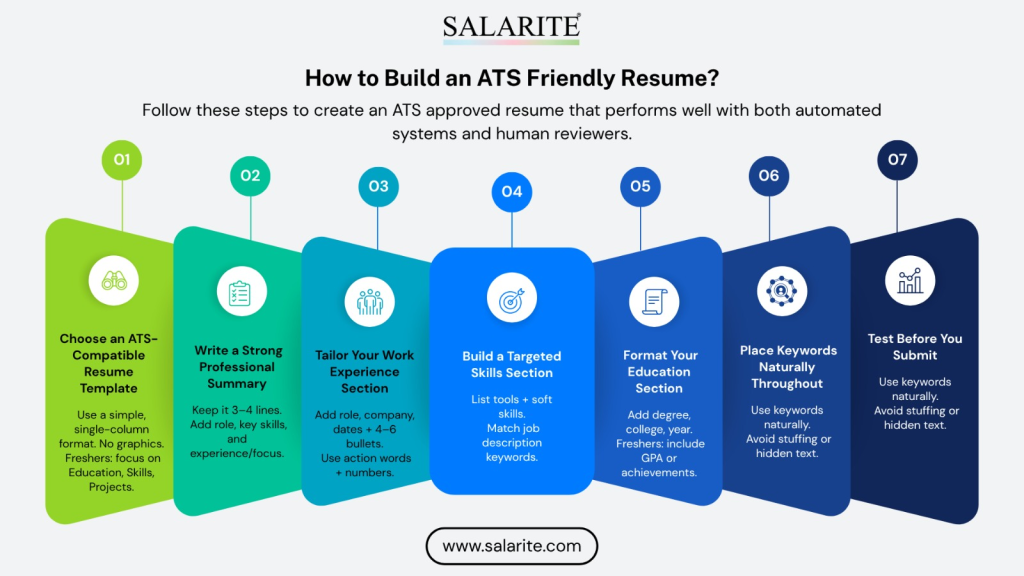
Follow these steps to create an ATS approved resume that performs well with both automated systems and human reviewers.
Step 1 — Choose an ATS-Compatible Resume Template
Start with a single-column, text-forward template. Avoid designs with graphics, icons, or decorative elements. For freshers — those entering the workforce for the first time — a CV format for freshers emphasizes Education, Skills, Projects, and Internships, typically kept to one page.
Step 2 — Write a Strong Professional Summary
Place your summary directly below your contact information. Keep it to 3–4 lines. Naturally include your job title, 2–3 key skills, and years of experience (or academic focus, for freshers).
Example:“Results-driven digital marketing graduate with hands-on experience in SEO, content strategy, and social media analytics. Skilled in Google Analytics, Semrush, and WordPress. Eager to contribute to a growth-focused marketing team.”
Step 3 — Tailor Your Work Experience Section
For each position, include your job title, company name, dates, and 4–6 achievement-based bullet points. Start every bullet with a strong action verb and include numbers where possible.
Example: “Led a team of 6 interns to deliver a campus brand campaign, reaching 4,000+ students across 3 colleges in under 30 days.”
Step 4 — Build a Targeted Skills Section
List both technical skills (tools, software, platforms) and relevant soft skills. Mirror the exact terminology from the job description.
Example:Python, SQL, Tableau, Power Bi, Data Analysis, Machine Learning, Statistical Modeling, Agile, Scrum, JIRA
Step 5 — Format Your Education Section
List your most recent degree first. Include degree name, field of study, institution, and graduation year. Freshers can also add relevant coursework, GPA (if above 3.5), and academic honors.
Step 6 — Place Keywords Naturally Throughout
Distribute your primary and secondary keywords across your Summary, Skills, and Work Experience sections. Never paste keywords in white text or dump them invisibly at the bottom — this is a disqualifying tactic most ATS platforms now detect.
Step 7 — Test Before You Submit
Run your resume through a free ATS checker or AI resume builder to see your compatibility score. Fix any gaps before submitting.
Explore more: Want more interview calls? Use an online resume builder—candidates with optimized resumes see up to 2x higher shortlisting rates from recruiters.
Common ATS Resume Mistakes to Avoid
- Using Tables or Text Boxes: Any content inside a table or text box may be completely invisible to ATS parsers. Replace all tables with plain-text formatting.
- Wrong File Format: Always check application instructions. Without specific guidance, .docx is the safest format.
- Non-Standard Fonts or Symbols: Symbols like ✓ or ★ may not parse correctly. Use standard bullet points (•) and ATS-safe fonts only.
- Sending a Generic Resume: Every application should have a tailored version that reflects the specific job description’s language. A single generic resume rarely scores well on ATS.
- Ignoring Spelling and Grammar: Some ATS platforms flag excessive errors as a quality signal. More importantly, a resume with errors signals carelessness to any human reviewer who follows.
Freshers With ATS Friendly Resumes Get More Interview Calls
Recruiters spend only 6–7 seconds scanning a resume. A properly optimized ATS friendly resume helps your skills get noticed faster and increases your chances of clearing automated filters.
Build Your ATS Friendly Resume with Salarite — Free
When it comes to free online resume builders that are built specifically for ATS compliance, Salarite stands out — especially for job seekers in India.
What Is Salarite?
Salarite is a free resume builder that lets you create a professional, ATS-friendly resume in minutes — with no signup required, no watermarks, and unlimited downloads. It was built to solve the exact problem most freshers and early-career professionals face: their resume looks fine visually but gets rejected by ATS before a recruiter ever sees it.
Salarite’s free resume builder online is ideal for freshers — you build and download instantly, at no cost, and the output is fully ATS-compliant.
Why Salarite Works Better Than Generic Builders
Most free tools like Canva or Microsoft Word let you format text — but they don’t optimize for ATS. Salarite is not just a resume creation tool; it’s a complete ecosystem designed to help candidates create resumes that are tailored, optimized, and impactful — whether they’re a fresher or an experienced professional.
Here’s what sets it apart:
- ATS-compliant templates — Single-column, clean layouts that parsers can read perfectly
- Guided section-by-section filling — You fill a structured form; Salarite builds the formatting automatically
- Fresher-specific CV format — Section order and content prompts tailored to new graduates
- Free PDF download, no watermark — You get a professional final file without paying anything
- No design skills needed — The tool handles margins, fonts, spacing, and structure for you
- India-specific — Built with Indian job markets, universities, and recruiter expectations in mind
Who Should Use Salarite?
Salarite is the right tool if you are:
- A fresher applying for your first job and unsure how to format your resume
- A recent graduate from an Indian university targeting FMCG, banking, sales, or tech roles
- A professional who wants to quickly update your resume without starting from scratch
- Anyone who wants an ATS approved resume without spending money on premium tools
How to Build Your Resume on Salarite — Step by Step
- Visit salarite.com/resume-builder
- Select your work status: Fresher, Experienced, or Intern
- Fill in your basic information — name, contact details, professional headline
- Add your education details (supports all Indian universities and degrees)
- Enter your employment or internship history and project details
- Add skills, certifications, and any other relevant information
- Download your ATS-friendly resume as a PDF — instantly, for free
Salarite’s ATS resume builder for freshers helps you create a job-ready resume in minutes, beat ATS filters instantly, and land your first job faster — 100% free.
Salarite vs. Other Free Resume Builders
| Feature | Salarite | Canva | Google Docs | Novoresume |
| ATS-optimized templates | Yes | Some | Depends | Yes |
| Free PDF download (no watermark) | Yes | Limited | Yes | Paid |
| Fresher CV format built-in | Yes | No | No | No |
| India-specific (universities, roles) | Yes | No | No | No |
| No signup required | Yes | No | No | No |
Other Free Tools to Build Your ATS Friendly Resume
Beyond Salarite, several free and freemium platforms help with ATS resume creation. Use these based on your specific needs.
Online Resume Builder / CV Maker Online Tools
- Canva — Choose ATS-safe templates (single column, minimal graphics only)
- Novoresume — ATS-friendly templates with one-page formatting
- Zety — Online CV maker with ATS resume tips built in
- Google Docs — Free, reliable, and widely compatible
ATS Checkers and Scanners
- Jobscan — Paste a job description and your resume to get a match score
- Resume Worded — Detailed feedback on phrasing, keywords, and formatting
- SkillSyncer — Free keyword matching tool
Related: Struggling to create a professional CV? Try a cv maker online to design an ATS-friendly resume in minutes and stand out in competitive job markets.
ATS Resume Tips Specifically for Freshers
If you’re a recent graduate entering the workforce for the first time, your resume structure differs from an experienced professional’s.
Lead With Education and Projects
When you lack extensive work history, your education, academic projects, internships, and certifications carry more weight. Place these sections higher on your resume.
Use a CV Format for Freshers
A standard CV format for freshers follows this order:
- Contact Information
- Professional Summary or Objective
- Education
- Skills
- Internships or Projects
- Certifications or Extracurriculars
Highlight Transferable Skills
Leadership in student organizations, freelance work, hackathon participation — all of these demonstrate relevant skills. Frame them with professional language and quantify results wherever possible.
Keep It to One Page
For freshers, one page is almost always the right choice. Recruiters spend an average of 6–7 seconds scanning a resume — make every line count.
Quick Reference: ATS Resume Checklist
Before submitting any application, run through this list:
- Contact information at the top (not inside a header or footer)
- Standard section headers (Experience, Education, Skills)
- Single-column or simple layout — no tables or text boxes
- Keywords from the job description placed naturally
- No graphics, images, or icons
- Saved as .docx or ATS-safe PDF
- Bullet points start with action verbs
- Achievements quantified where possible
- Proofread for spelling and grammar errors
- Tested with a free ATS checker like Salarite or Jobscan
Author’s Thoughts
Creating an ATS friendly resume doesn’t mean sacrificing personality or depth. It means presenting your experience in a way that both machines and humans can read clearly. The most effective resume balances ATS compliance with compelling, achievement-focused content.
Start with a purpose-built tool like Salarite’s free AI resume builder — it handles the formatting, structure, and ATS compliance automatically, so you can focus on telling your career story effectively. Whether you’re a fresher building your first CV or a professional updating your profile, following these steps will help your resume reach where it belongs: in front of a real hiring manager.
Build an ATS Friendly Resume in Just 5 Minutes
Most candidates lose interview opportunities because their resumes fail ATS scans. Salarite helps you create an ATS friendly resume with the right format, keywords, and structure — completely free.
Trusted by thousands of Indian job seekers · No signup needed. No Watermark. Free download
FAQs
An ATS-friendly resume is a document designed to be easily read and processed by Applicant Tracking Systems (ATS). It uses simple formatting, standard headings, and relevant keywords so systems like Workday or Zoho Recruit can correctly parse and rank it.
Most companies use ATS to filter applications, and over 70% of resumes are rejected before reaching a recruiter. An ATS-friendly resume increases your chances of getting shortlisted by ensuring your profile is correctly interpreted and ranked.
ATS software works in three main steps:
a. Parsing: Extracts and organizes your resume data
b. Keyword Matching: Compares your resume with the job description
c. Ranking: Assigns a score based on relevance
This determines whether your resume reaches a human recruiter.
The safest formats are:
a. .docx (recommended)
b. Plain text (.txt) Some PDFs may work, but only if they are ATS-compatible.
Avoid elements that ATS cannot read properly, such as:
a. Tables and text boxes
b. Images, icons, or graphics
c. Headers and footers
d. Decorative fonts
These can cause parsing errors and lead to rejection.
Keywords are critical because ATS matches your resume with the job description. Using exact terms like “project management” instead of variations improves your ranking and visibility.
A strong ATS resume should include:
a. Professional Summary
b. Work Experience
c. Education
d. Skills
e. Certifications or Projects
Using standard headings ensures the ATS recognizes each section correctly.
Yes. Freshers should focus on:
a. Education
b. Academic projects
c. Internships
d. Skills and certifications
A well-structured fresher CV can still rank well in ATS systems.