
Most freshers assume the recruiter skipped their resume. The truth is, a recruiter never saw it. An ATS compliant resume is what separates applications that get read from applications that get deleted by software in under 10 seconds.
In India, companies receiving hundreds of applications per opening use Applicant Tracking Systems to filter resumes automatically before any human review. If your resume is not formatted correctly — wrong layout, missing keywords, wrong file type — it fails the scan and you are out. The resume itself does not matter if the machine cannot read it.
This guide covers what makes a resume ATS compliant, the right format for freshers, how to create resume online free using tools built for Indian job seekers, and where AI CV builders actually help versus where they waste your time.
What Is an ATS Compliant Resume?
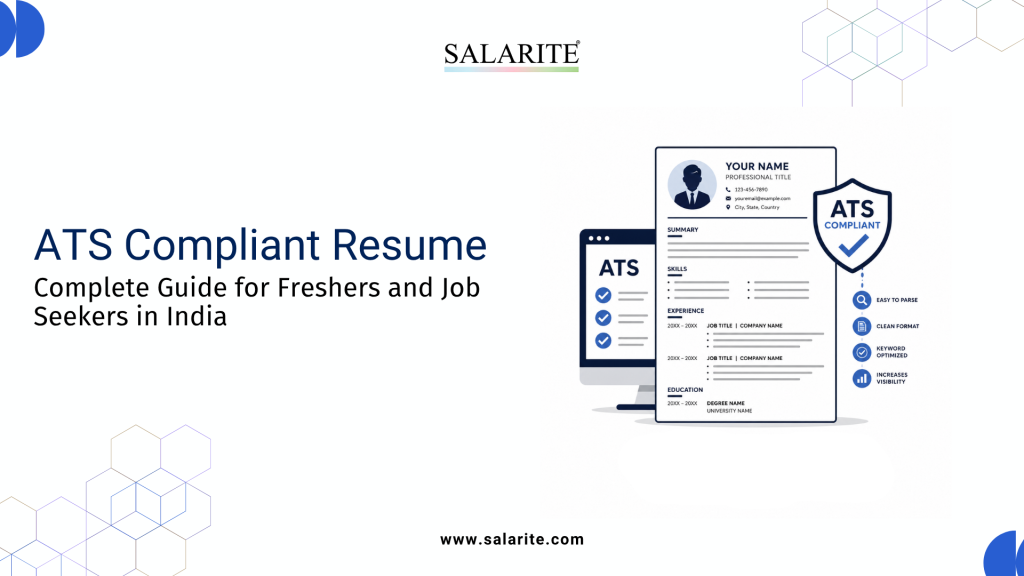
An ATS compliant resume is a resume formatted to pass through Applicant Tracking System (ATS) software before a human recruiter ever sees it.
Most medium and large companies in India — IT firms, banks, FMCG companies, manufacturing plants — use ATS to automatically scan and rank thousands of applications. If your resume is not ATS compliant, it gets filtered out before any recruiter reads it.
The software scans for keywords, job titles, skills, and formatting. A PDF with fancy columns, icons, or graphics may look impressive on screen but reads as garbled text to an ATS parser.
An ATS compliant resume removes the visual clutter and uses clean structure, relevant keywords, and a readable format that machines can parse correctly.
Why ATS Screening Matters for Indian Job Seekers
India produces approximately 1.5 crore graduates every year. On a single Naukri or LinkedIn job posting, a recruiter may receive 500 to 5,000 applications within days.
No team manually reads 5,000 resumes. ATS does the first pass.
Global hiring research consistently shows that over 70% of resumes submitted online are rejected by ATS before a human reviews them. For freshers applying through company career portals, campus placement portals, or job boards, most applications are eliminated in seconds.
The problem is straightforward: candidates spend hours writing their resume and zero time making it ATS-readable. They use creative templates with two-column layouts, tables, and colored headers. These break ATS parsing and result in automatic rejection.
For freshers applying to IT companies, BFSI roles, FMCG sales jobs, or manufacturing positions, ATS screening is the first and most common reason qualified candidates get eliminated.
Need a Professional Resume Fast?
Create a recruiter-ready resume in minutes with Salarite’s ATS-friendly resume builder and start applying to active jobs across India.
ATS Compliant Resume | Resume Builder for Freshers | Easy PDF Download | No Sign Up Needed | No Watermark
How ATS Software Actually Reads Your Resume
ATS software does not read your resume the way a recruiter does. It extracts text, matches it to pre-defined fields, and ranks candidates by keyword match scores.
Here is what ATS software looks for:
- Keywords: Job title, skills, tools, and qualifications from the job description
- Section labels: Standard headers like “Work Experience,” “Education,” “Skills” — not creative labels like “My Journey” or “What I’ve Done”
- Dates and formatting: Consistent date formats and chronological structure
- File format: .docx and plain PDF files parse cleanly; heavily designed PDFs often do not
- Keyword placement: Relevant terms in the right sections, not crammed into a summary
If an ATS cannot extract your contact details, education, or work history correctly, your application is ranked low or dropped.
ATS Compliant Resume Format for Freshers
Most freshers make the same mistake: download a stylish Canva template, fill it in, and send it off. Canva templates look good in screenshots. They fail ATS badly.
Here is the resume format for freshers that passes ATS:
Recommended Sections (in order)
- Contact Information — Name, phone, email, city, LinkedIn URL. No photo, no date of birth.
- Career Objective — 2–3 lines targeting the specific role
- Key Skills — A bullet list of relevant skills and tools
- Education — Degree, institution, year, percentage or CGPA
- Projects / Internships — 2–3 items with specific outcomes, not just responsibilities
- Certifications — NPTEL, Coursera, LinkedIn Learning, or sector-specific certifications
- Achievements (optional) — Only if genuinely relevant
Formatting Rules That Matter
- Single-column layout only
- Font: Arial, Calibri, or Times New Roman at 10–12pt
- No tables, no text boxes, no graphics or icons
- Do not put critical information in Word’s header/footer zones — ATS skips them
- File format: .docx or a plain single-layer PDF
- Length: 1 page for freshers, 2 pages maximum
Also Read: Resume for Applicant Tracking System — Practical Tips That Work — covers exactly how ATS parsers score your resume and what you can do to raise your match rate.
How to Create Resume Online Free — Step by Step
You do not need Word, Canva, or a designer. Free resume builder platforms produce ATS-ready files in minutes.
Step 1: Choose a Free Resume Builder for Freshers
Go to Salarite’s Resume Builder. It offers ATS-optimized templates built for Indian job seekers. No registration or payment needed to start.
Step 2: Select an ATS-Friendly Template
Choose a clean, single-column template. Skip two-column or graphic-heavy options. Salarite’s templates are tested against common ATS parsers used by Indian companies.
Step 3: Fill In Your Information
Start with contact details, then education, skills, internships, and projects. Be specific. Instead of “good communication skills,” write something like “delivered presentations at 3 college technical events.”
Step 4: Add Keywords From the Job Description
Read the job posting. Identify the skills and tools mentioned. Include them in your Skills section and project descriptions naturally. If the JD says “proficiency in Excel,” write exactly “Microsoft Excel” — not just “spreadsheets.”
Step 5: Download in the Right Format
Download as .docx or plain PDF. Do not download as an image or a design-heavy PDF.
Step 6: Test Before Sending
Paste your resume text into a plain text editor (Notepad, TextEdit). If it reads cleanly without garbled characters or missing sections, it will parse correctly in most ATS systems.
Want a full walkthrough? Read How to Create Resume Online Free — covers account setup, template selection, and download options step by step with screenshots.
Best Free Resume Builder Online for Freshers in India
Most popular global resume builders are designed for Western job markets. Their formats often do not match what Indian recruiters expect.
Resume Builder Comparison Table
| Feature | Salarite Resume Builder | Canva | Zety | Resumemaker.online |
| ATS-Optimized Template | Yes | No | Partial | Partial |
| Built for Indian Job Market | Yes | No | No | No |
| Free Download (.docx) | Yes | Paid | Paid | Limited |
| No Registration Required | Yes | No | No | No |
| Fresher-Specific Templates | Yes | Generic | Generic | Generic |
| AI Content Suggestions | No | No | Yes (Paid) | No |
Salarite’s free resume builder is built for Indian hiring contexts. Templates follow formats familiar to HR teams in FMCG, banking, manufacturing, sales, and IT.
AI CV Builder: Does It Actually Help?
AI CV builders have become genuinely useful — but only if you know what they are good at.
An AI CV builder does three things well:
- Suggests missing keywords based on the job description you paste in
- Rewrites weak bullet points into outcome-focused statements
- Flags ATS compliance issues like missing sections or broken formatting
Where they fall short: they cannot decide which experience is relevant for a specific role. They also tend to produce generic summaries. A profile that says “dynamic professional with a passion for excellence” tells a recruiter nothing and matches every other AI-generated resume in the pile.
Use an AI CV builder to sharpen your content and check keyword alignment — not to generate it from scratch. Your job descriptions, projects, and outcomes need to come from you.
ATS Resume Checklist — What Recruiters Actually Look For
Run through this before submitting any application.
Format
- [ ] Single-column layout
- [ ] Standard readable font (Arial, Calibri, Times New Roman)
- [ ] No tables, text boxes, or graphics
- [ ] File saved as .docx or plain PDF
- [ ] 1 page (fresher) or max 2 pages
Content
- [ ] Job title or target role in the Career Objective
- [ ] Skills section includes terms from the job description
- [ ] Education section has degree, institution, year, and grade
- [ ] Projects and internships describe outcomes, not just duties
- [ ] No spelling or grammar errors
Keyword Optimization
- [ ] Primary job-relevant skill appears 2–3 times naturally
- [ ] Tools and technologies spelled exactly as in the JD
- [ ] “Bachelor of Technology” written in full at least once before abbreviating to “B.Tech”
Contact Information
- [ ] Current phone number with +91 prefix
- [ ] Professional email ID — not “coolboy2001@gmail.com”
- [ ] City and state
- [ ] LinkedIn URL (if your profile is complete)
Start Building: Free Resume Builder Online — ATS Compliant Resume — see all available templates, download formats, and ATS compatibility details before you start.
Common ATS Resume Mistake
1. Using a Two-Column Template
This is the most common problem. Two-column templates look clean to humans, but most ATS parsers read left-to-right, top-to-bottom in a single flow. Skills in a right column end up mixed into your work experience in the parsed output.
2. Putting Contact Details in the Header Zone
Word and design tools have a dedicated header area. ATS systems frequently skip content placed there entirely. Put your name and contact details in the main document body.
3. Using Images, Icons, or Dividers
Templates with icons next to skill names or decorative line dividers confuse parsers. The surrounding text sometimes gets dropped along with the image element.
4. Writing Vague Skill Descriptions
“Good with computers” means nothing to ATS or to a recruiter. Write specifically: “Python (data analysis, scripting),” “Tally ERP 9,” “MS Excel (VLOOKUP, pivot tables).”
5. Sending a Canva PDF Without Testing
A PDF exported from Canva embeds text as a visual layer, not readable text. Always test by copying and pasting text from your PDF. If it copies cleanly into Notepad, it will parse cleanly in ATS.
Expert Tips From Recruiters
Observations from hiring workflows across FMCG, banking, and IT sectors in India:
Tailor the resume, do not spray it. Sending the same resume to 50 jobs is less effective than tailoring it for 10. Adjust your objective statement and skills to match each role. It takes 10 minutes per application and raises ATS match scores measurably.
Projects matter more than marks. For freshers, a final year project with a clear outcome carries more weight than a high CGPA alone. State what you built, what technology you used, and what result it produced.
Certifications fill the experience gap. No internship? A Google certification in Digital Marketing, NPTEL certificate in Data Science, or SEBI certification in financial markets is a recognized substitute in most ATS systems and among Indian HR teams.
Stick to one version. Many freshers have 5–6 inconsistent resume versions circulating across portals. Pick one well-optimized version, update it regularly, and use it consistently across all platforms.
Your email address matters. Recruiters notice unprofessional IDs. Create one with your name before you start applying.
Author Thought
Most freshers are eliminated before a recruiter ever reads their name. The ATS reads your resume first, and if it cannot parse it correctly, your application ends there.
Building an ATS compliant resume is not complicated. It requires the right format, the right keywords, and a free resume builder actually built for how Indian companies hire.
Skip the Canva templates. Use a purpose-built free resume builder that outputs ATS-ready files. Tailor for each application. Be specific about your skills and what you produced in your projects.
Your resume passes the machine first. Then it convinces a person.
Need a Professional Resume Fast?
Create a recruiter-ready resume in minutes with Salarite’s ATS-friendly resume builder and start applying to active jobs across India.
ATS Compliant Resume | Resume Builder for Freshers | Easy PDF Download | No Sign Up Needed | No Watermark
FAQs
A: An ATS compliant resume is formatted so that Applicant Tracking System software can correctly read and rank it. It uses standard section headings, single-column layout, relevant keywords, and clean file formats like .docx or plain PDF.
A: Yes. Most companies in India with structured hiring — IT firms, banks, FMCG companies, large manufacturers — use ATS to screen applications. Freshers applying online or through campus portals are subject to the same screening.
A: A single-column reverse-chronological format with sections for Career Objective, Skills, Education, Projects, and Certifications. Plain font, no graphics.
A: Yes. Salarite’s free resume builder online lets you create, customize, and download an ATS-ready resume without registration or payment.
A: No. Canva templates use design elements, columns, and image-based formatting that most ATS systems cannot parse correctly. Use a purpose-built ATS resume builder instead.
A: An AI CV builder suggests keywords, improves bullet points, and flags formatting issues based on the job description you input. Salarite’s resume builder includes AI content suggestions at no cost.
A: One page. A tightly written two-page resume is acceptable if you have relevant internships, multiple certifications, and strong projects — but one page is the standard under two years of experience.
A: Only if the job posting asks for it. ATS systems cannot process images, and photos can introduce unintentional screening bias.
A: Use exact terms from the job description — job titles, tools, technologies, and required skills. For a finance role: “MS Excel,” “financial reporting,” “Tally ERP.” For IT roles: specific languages and frameworks.
A: Copy-paste your resume text into a plain text document. If it reads logically without garbled text or missing sections, it is likely ATS-readable. You can also use Salarite’s ATS compatibility checker at salarite.com