
In today’s competitive job market, your resume is often the first impression you make on an employer. Whether you’re a fresher applying for your first job or an experienced professional looking for better career opportunities, a well-crafted resume can determine whether you get shortlisted or overlooked.
Studies show that recruiters spend only 6–8 seconds reviewing a resume before deciding whether to continue reading. If your resume lacks proper formatting, relevant keywords, or a professional layout, it may be rejected immediately—even if you’re qualified for the role.
The challenge doesn’t stop there. Most companies now use Applicant Tracking Systems (ATS) to screen resumes before a recruiter even sees them. If your resume isn’t optimized for ATS, it may never reach the hiring manager.
This is where a CV Builder becomes invaluable.
Instead of spending hours formatting a resume in Microsoft Word, an online CV Builder helps you create a professional, ATS-friendly resume within minutes. It ensures your resume follows industry standards, includes the right sections, and is formatted correctly for both recruiters and ATS software.
With the Salarite CV Builder, you can:
- Create an ATS-friendly professional resume
- Choose from multiple modern resume templates
- Get AI-powered resume suggestions
- Download your resume instantly as a PDF
- Apply directly for verified jobs from the same platform
Everything you need to build your career is available in one place.
Build your professional resume today with Salarite CV Builder and start applying for jobs with confidence.
What is a CV Builder Online?
A CV Builder Online is a web-based resume creation platform that enables job seekers to design, edit, download, and manage professional resumes using ATS-friendly templates and intelligent formatting.
It removes the complexity of resume writing and allows users to focus on showcasing their qualifications rather than formatting documents.
How Does a CV Builder Work?
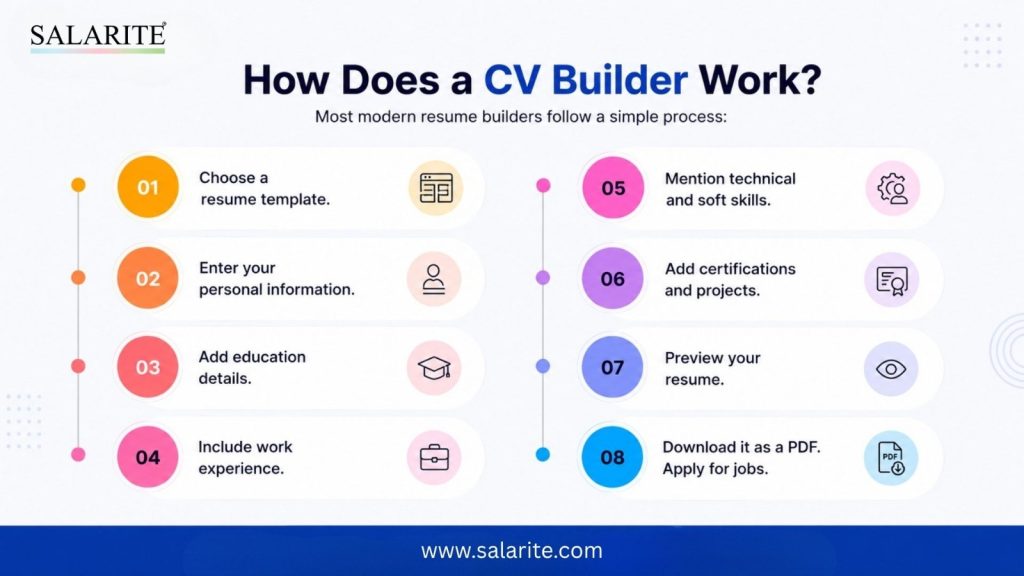
Most modern resume builders follow a simple process:
- Choose a resume template.
- Enter your personal information.
- Add education details.
- Include work experience.
- Mention technical and soft skills.
- Add certifications and projects.
- Preview your resume.
- Download it as a PDF.
- Apply for jobs.
The Salarite AI Resume Builder makes this process even easier by offering content suggestions and ensuring your resume follows an ATS-compatible format.
Why Do People Prefer Online Resume Builders?
Creating a resume manually takes time and often results in formatting issues.
An online CV Builder simplifies the entire process by offering professionally designed templates, automatic formatting, and ATS optimization.
People prefer online builders because they:
- Save significant time.
- Require no design skills.
- Maintain professional formatting.
- Produce recruiter-friendly resumes.
- Support quick edits and updates.
- Allow easy PDF downloads.
- Help create resumes for different job roles.
For both freshers and experienced professionals, using an online builder reduces errors and improves resume quality.
Create – Your Online CV Now
Manual Resume vs Online CV Builder
Traditional resume creation using Microsoft Word often leads to inconsistent formatting and compatibility issues.
An online CV Builder eliminates these problems by automating formatting and organizing your information professionally.
The result is a polished resume that is easier for recruiters and ATS software to read.
Why Use an Online CV Builder Instead of MS Word?
Many job seekers still rely on Microsoft Word to create resumes.
Although Word is a powerful document editor, it wasn’t designed specifically for resume creation. Users often spend hours adjusting margins, fonts, spacing, and layouts.
A dedicated CV Builder solves these challenges by automating the entire process.
| Feature | CV Builder Online | MS Word |
| ATS-Friendly Formatting | Yes | Formatting Issues |
| Professional Templates | Included | Manual Design |
| AI Suggestions | Available | No Guidance |
| Resume Download PDF | One Click | Manual Conversion |
| Easy Editing | Fast | Time Consuming |
| Apply Directly for Jobs | Integrated | No Integration |
Benefits of Using a CV Builder
- Saves Time: Instead of designing a resume manually, you simply fill in your details.
- Professional Appearance: Templates are designed according to modern hiring standards.
- ATS Optimization: Your resume follows an ATS Resume Format, increasing the chances of passing automated screening.
- Error-Free Formatting : No broken layouts or inconsistent spacing.
- Easy Updates : Need to add a new job or certification? Simply edit your resume without rebuilding the entire document.
- Multiple Resume Versions : Create tailored resumes for different industries and job roles.
How to Create a Resume Using CV Builder Online
Creating a professional resume is easy with Salarite.
Follow these simple steps.
Step 1: Choose a Resume Template
Select a professionally designed template based on your career level and preferred style.
Step 2: Enter Personal Details
Add essential information, including:
- Full Name
- Mobile Number
- Email Address
- LinkedIn Profile
- Portfolio (if applicable)
- Location
Ensure all details are accurate and up to date.
Step 3: Add Education
Mention your:
- Degree
- Institution
- Passing Year
- Percentage or CGPA
- Relevant coursework (optional)
Freshers should highlight academic achievements and certifications.
Step 4: Add Work Experience
Experienced professionals should include:
- Job Title
- Company Name
- Employment Duration
- Key Responsibilities
- Measurable Achievements
Use action-oriented language and quantify results wherever possible.
Step 5: Add Skills
Include a balanced mix of technical and soft skills.
Examples:
Technical Skills
- Microsoft Excel
- Python
- SQL
- Java
- AutoCAD
- Digital Marketing
- Tally ERP
Soft Skills
- Leadership
- Communication
- Teamwork
- Problem Solving
- Time Management
Tailor your skills to the job description to improve ATS compatibility.
Step 6: Preview Your Resume
Before downloading, review your resume carefully.
Check for:
- Spelling mistakes
- Formatting consistency
- Missing information
- ATS-friendly headings
- Correct contact details
A polished resume creates a strong first impression.
Step 7: Download Your Resume
Once satisfied, download your resume as a PDF.
This ensures the formatting remains consistent across all devices and is the preferred format for most employers.
Step 8: Apply for Jobs
With your resume ready, start applying for verified opportunities directly through Salarite.
Instead of creating resumes on one website and searching for jobs on another, Salarite lets you manage both tasks from a single platform—saving time and simplifying your job search.
Create Your Online Resume in Minutes
Create a professional, ATS-friendly resume using Salarite’s CV Builder and increase your chances of getting shortlisted by top employers.
Create Your Online CV – Apply with Confidence
ATS Resume Best Practices Checklist
Follow this checklist to improve your chances of passing ATS screening.
1. Use Standard Resume Headings
Use commonly recognized headings such as:
- Professional Summary
- Work Experience
- Education
- Skills
- Certifications
- Projects
Avoid creative titles like “My Journey” or “Career Story.”
2. Include Relevant Keywords
Carefully read the job description and include important keywords naturally.
For example, if applying for a Digital Marketing role, include terms like:
- SEO
- Google Analytics
- PPC
- Content Marketing
- Social Media Marketing
The Salarite AI Resume Builder helps identify relevant keywords while creating your resume.
3. Download as PDF
PDF files maintain consistent formatting and are accepted by most employers.
Always ensure your PDF is selectable text and not a scanned image.
Avoid Tables
Many ATS platforms struggle to interpret tables correctly.
Use simple bullet points instead.
4. Avoid Graphics and Icons
Logos, rating bars, charts, icons, and images can confuse ATS software.
Keep your resume text-based and clean.
5. Use Professional Fonts
Recommended fonts include:
- Calibri
- Arial
- Helvetica
- Times New Roman
Avoid decorative or handwritten fonts.
6. Keep Formatting Simple
Maintain:
- Consistent spacing
- Proper margins
- Uniform font sizes
- Clear section headings
Professional formatting improves readability for both ATS software and recruiters.
Looking for a Free ATS Resume Builder?
Best Resume Sections Every CV Should Include
Every successful resume contains essential sections that help employers evaluate your qualifications quickly.
Personal Information
Include:
- Full Name
- Mobile Number
- Professional Email Address
- City and State
- LinkedIn Profile
- Portfolio or Website (if applicable)
Avoid including unnecessary personal details such as marital status, religion, or nationality unless specifically requested.
Professional Summary
A professional summary provides a quick overview of your skills, experience, and career goals.
- Example for Freshers: Motivated Computer Science graduate with strong analytical and problem-solving skills. Experienced in Java, Python, and SQL through academic projects and internships. Seeking an opportunity to contribute to a growth-oriented organization.
- Example for Experienced Professionals: Results-driven Sales Manager with over six years of experience in business development, client relationship management, and revenue growth. Consistently exceeded sales targets through strategic planning and team leadership.
- Skills: Your skills section should include both technical and interpersonal abilities.
1. Technical Skills
- Microsoft Excel
- SQL
- Java
- Python
- Power BI
- AutoCAD
- Digital Marketing
- Tally Prime
- SAP
2. Soft Skills
- Leadership
- Communication
- Teamwork
- Time Management
- Critical Thinking
- Adaptability
- Negotiation
- Problem Solving
Match your skills with the job description to improve ATS compatibility.
3. Work Experience
Employers prefer measurable achievements rather than general responsibilities.
Instead of:
Responsible for customer support.
Write:
- Resolved more than 70 customer queries daily while maintaining a 96% customer satisfaction score.
- Reduced complaint resolution time by 25%.
- Improved customer retention through proactive follow-up.
Use action verbs such as:
- Managed
- Led
- Developed
- Improved
- Increased
- Reduced
- Implemented
- Achieved
- Coordinated
1. Education
Include:
- Degree
- College or University
- Graduation Year
- Percentage or CGPA
- Relevant coursework (optional)
Freshers can also mention scholarships or academic achievements.
2. Projects
Projects showcase practical skills, especially for students and recent graduates.
Include:
- Project Title
- Technologies Used
- Objective
- Results
- Key Learning
Projects demonstrate real-world experience even without full-time employment.
3. Certifications
Professional certifications strengthen your profile.
Examples:
- Google Digital Marketing
- Microsoft Excel Certification
- AWS Cloud Practitioner
- Data Analytics
- HR Analytics
- Six Sigma
- Tally Prime Certification
List only certifications relevant to your target role.
4. Achievements
Highlight accomplishments that demonstrate impact.
Examples:
- Employee of the Month
- Sales Target Achiever
- Best Intern Award
- Academic Topper
- Hackathon Winner
- Scholarship Recipient
Achievements help distinguish your resume from other applicants.
5. Languages
Mention languages you can communicate in effectively.
Example:
- English – Professional Proficiency
- Hindi – Native Proficiency
- French – Basic
Language skills can be valuable for customer-facing and international roles.
6. References
References are generally optional unless requested by the employer.
You may simply write:
References available upon request.
Tips to Make Your Resume Stand Out
Creating a professional resume is about more than just listing qualifications. The following strategies can help you make a stronger impression on recruiters.
1. Use Strong Action Verbs
Replace weak words with impactful verbs such as:
- Achieved
- Led
- Developed
- Implemented
- Increased
- Improved
- Coordinated
- Designed
- Managed
- Optimized
These words demonstrate initiative and measurable impact.
2. Highlight Achievements
Instead of describing responsibilities, focus on accomplishments.
Example:
- Increased website traffic by 45% through SEO optimization.
- Reduced customer response time by 30%.
- Generated ₹15 lakh in annual sales revenue.
- Trained and mentored a team of 12 employees.
Numbers help recruiters understand the value you’ve delivered.
3. Add ATS Keywords
Customize your resume for every job application by including keywords from the job description.
For example:
- Project Management
- Data Analysis
- Recruitment
- Customer Service
- Java
- Python
- SQL
- Tally Prime
- AutoCAD
The Salarite AI Resume Builder helps identify relevant keywords for different industries.
4. Tailor Your Resume
Avoid sending the same resume for every job.
Create separate versions for:
- Software Development
- Banking
- Human Resources
- Marketing
- Sales
- Manufacturing
- Finance
A targeted resume significantly improves your chances of getting shortlisted.
5. Write a Strong Professional Summary
Your summary should immediately communicate your value.
Example:
Results-oriented Marketing Executive with four years of experience in SEO, paid advertising, and digital campaigns. Proven ability to increase online visibility and generate qualified leads through data-driven marketing strategies.
Your – Career Starts with a Great Resume
6. Showcase Relevant Skills
Include both technical and soft skills that match the job requirements.
Examples include:
Technical Skills
- Microsoft Excel
- SQL
- Python
- Java
- Adobe Photoshop
- Google Analytics
- AutoCAD
Soft Skills
- Leadership
- Communication
- Problem Solving
- Teamwork
- Time Management
7. Include Certifications
Professional certifications demonstrate continuous learning.
Popular certifications include:
- Google Digital Marketing
- AWS Cloud Practitioner
- Microsoft Excel Expert
- Data Analytics
- HR Analytics
- PMP
- Six Sigma
- Tally Prime
What is Salarite CV Builder?
Salarite CV Builder is a free online resume-building platform that helps job seekers create professional, ATS-friendly resumes in just a few minutes. Whether you’re a fresher, experienced professional, student, or career changer, the Salarite CV Builder provides ready-to-use templates, structured sections, and recruiter-friendly formatting to improve your chances of getting shortlisted.
Unlike traditional resume creators, Salarite combines resume building with job search opportunities, allowing candidates to create a resume and immediately apply for relevant jobs across India.
How Does Salarite CV Builder Work?
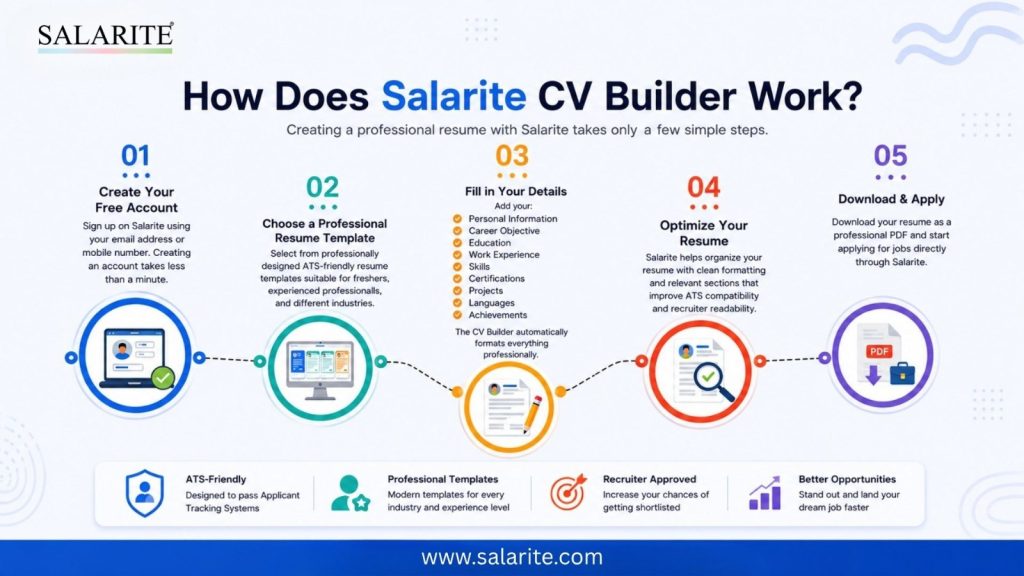
Creating a professional resume with Salarite takes only a few simple steps.
Step 1: Create Your Free Account
Sign up on Salarite using your email address or mobile number. Creating an account takes less than a minute.
Step 2: Choose a Professional Resume Template
Select from professionally designed ATS-friendly resume templates suitable for freshers, experienced professionals, and different industries.
Step 3: Fill in Your Details
Add your:
- Personal Information
- Career Objective
- Education
- Work Experience
- Skills
- Certifications
- Projects
- Languages
- Achievements
The CV Builder automatically formats everything professionally.
Step 4: Optimize Your Resume
Salarite helps organize your resume with clean formatting and relevant sections that improve ATS compatibility and recruiter readability.
Step 5: Download & Apply
Download your resume as a professional PDF and start applying for jobs directly through Salarite.
Why Choose Salarite CV Builder Online?
The Salarite CV Builder is designed to simplify resume creation while helping job seekers increase their chances of getting shortlisted.
1. ATS-Friendly Resume Template: Every template is optimized for Applicant Tracking Systems, ensuring your resume is easy for recruiters and ATS software to read.
2. Easy-to-Use Builder: Create a professional resume without any design or formatting experience.
3. Instant PDF Download
Download your resume in a clean, print-ready PDF format with a single click.
4. AI-Powered Resume Assistance
Receive intelligent suggestions for professional summaries, skills, experience descriptions, and keywords.
5. Multiple Resume Templates
Choose from professional, modern, minimalist, and executive layouts that match your career goals.
6. Apply for Jobs Directly
Unlike many resume builders, Salarite lets you build your resume and apply for verified job opportunities from the same platform.
7. Perfect for Freshers
Students and recent graduates can create an impressive Fresher CV Format by highlighting projects, internships, certifications, and academic achievements.
8. Ideal for Experienced Professionals
Showcase career progression, leadership experience, measurable achievements, and industry expertise with professionally structured templates.
9. Free Registration
Sign up for free and start building your resume without complicated setup processes.
One Complete Career Platform
With Salarite, you can:
- Build your resume
- Download it as a PDF
- Search verified jobs
- Apply online
- Manage your job applications
Everything is available from one platform, making your job search faster and more organized.
Create Your Resume with Salarite CV Builder Today
Your resume is more than just a document—it’s your first opportunity to impress employers and secure interviews. A professionally designed, ATS-friendly resume can significantly improve your chances of getting noticed in today’s competitive job market.
With the Salarite CV Builder, you can create a polished resume in minutes, receive AI-powered content suggestions, choose from modern templates, download your resume instantly as a PDF, and apply for thousands of verified jobs—all from one platform.
Whether you’re a student preparing your first Fresher CV Format, a professional updating your career profile, or someone exploring a Free ATS Resume Builder, Salarite provides the tools you need to build a resume that stands out.
Create Your Professional CV in Minutes – Stand Out to Recruiters
Build an ATS-friendly resume with Salarite’s CV Builder and showcase your skills, experience, and achievements with confidence.
Start Building Your CV Today – Get Job Ready Faster
FAQ
A CV Builder is an online tool that helps job seekers create professional and structured CVs quickly. It provides ready-made templates, formatting options, and guidance to build an impressive CV that highlights skills, experience, and qualifications.
A CV Builder simplifies the resume creation process by offering professional templates, proper formatting, keyword suggestions, and section-wise guidance. It helps candidates create a clear and job-ready CV without needing advanced design skills.
Yes, a CV Builder is highly useful for freshers. It helps them create a professional CV by highlighting education, internships, skills, certifications, and projects, even when they have limited work experience.
Yes, many modern CV Builders help create ATS-friendly CVs by using clean layouts, relevant keywords, proper headings, and recruiter-friendly formats that improve the chances of passing Applicant Tracking Systems.
Using a CV Builder, you can create a professional CV within a few minutes. You only need to add your personal details, skills, education, experience, and customize the available templates.
You should include your name, contact details, career objective, education, work experience, skills, achievements, certifications, projects, and other relevant information based on the job role you are applying for.
A CV Builder saves time and provides professional formatting compared to creating a CV manually. It helps maintain the right structure and ensures your CV looks attractive and recruiter-friendly.
Yes, most CV Builders allow users to customize templates, change sections, update content, add skills, and modify layouts according to their career goals and job requirements.
An online CV Builder helps job seekers create professional CVs faster, improve their presentation, follow industry standards, and increase their chances of getting noticed by recruiters.
You can create a free professional CV online using Salarite’s CV Builder. It helps job seekers build ATS-friendly CVs with modern templates and career-focused formats to apply for jobs confidently.