
You’ve completed your degree. Now comes the part nobody prepares you for — writing a resume when you have almost nothing to put on it.
Most freshers either copy a friend’s format, download a random Word template, or spend three hours on Canva building something that looks good but gets rejected by every ATS before a recruiter even sees it.
This guide covers the exact resume format for freshers that work in 2026 — what sections to include, how to structure them with zero work experience, which tools actually help, and how to make sure your resume clears automated screening.
Quick Answer
What is the best resume format for freshers?
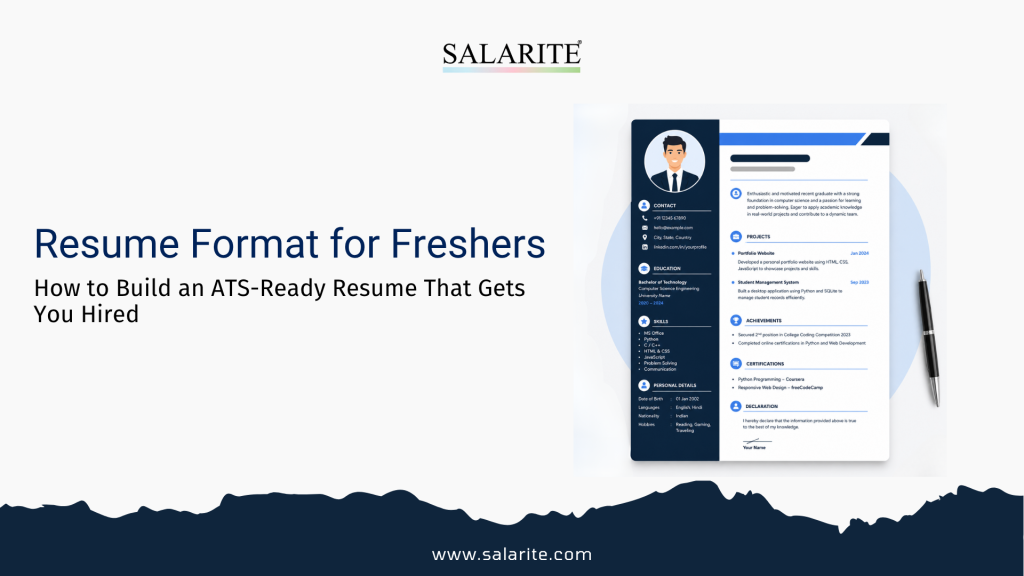
Fresh graduates should use a reverse-chronological or combination format with these sections in order: contact information, career objective, education, skills, internships or projects, certifications, and extracurriculars. Keep it to one page. Use a clean single-column or simple two-column layout. Avoid graphics, tables, and images — they break ATS parsing.
What Makes a Fresher Resume Different
A senior professional has 10 years of work to fill a page. You don’t — and that’s fine.
The mistake most freshers make is trying to pad the resume with vague language: “hardworking,” “team player,” “eager to learn.” Recruiters see hundreds of these a week. These phrases add length but communicate nothing.
A well-built fresher resume does something different: it leads with relevant education and skills, shows real project work or internship output, and makes the recruiter’s screening job easier. Clarity beats length, every time.
Create your fresher resume in minutes — Use Salarite’s Free Resume Builder to build an ATS-friendly resume with professional templates designed for Indian job seekers.
Resume Format Options: Which One Works for Freshers
Reverse-Chronological Format
Lists your most recent education and experience first. This is the standard format and the safest choice for freshers applying to structured companies, MNCs, and campus placements.
Best for: Engineering, commerce, science, and MBA graduates applying to mid-size and large companies.
Combination Format
Leads with a skills section before moving into education and experience. Good if you have a strong technical skillset (like coding languages or design tools) that’s more relevant than your degree tier.
Best for: IT freshers, digital marketing candidates, UX/UI designers, data analytics applicants.
Functional Format
Focuses entirely on skills and achievements, hiding the lack of experience. Most ATS systems struggle to parse functional resumes — skip this one.
The Right Resume Format for Freshers: Section by Section
1. Contact Information
Keep this simple. Name, phone number, professional email, LinkedIn URL, city name. That’s it.
Do not add your full address, date of birth, marital status, or a photo. In 2025, none of these are required — and photos create unnecessary bias risk.
Example:
Priya Sharma
+91 98765 43210 | priya.sharma@gmail.com
LinkedIn: linkedin.com/in/priyasharma | Jaipur, Rajasthan
2. Career Objective (60–80 Words, Not a Generic Summary)
Most career objectives read like this: “Seeking a challenging position in a dynamic organization where I can utilize my skills and contribute to company growth.”
This says nothing. Write a specific one instead.
Good example:
B.Com graduate with strong understanding of GST compliance and tally operations. Completed 3-month internship with a CA firm handling accounts payable for 20+ clients. Looking for an accounts executive role in Jaipur or remote with a growth-stage company.
That’s 42 words. It’s specific, credible, and gives the recruiter something to hold onto.
3. Education
List your most recent degree first. Include:
- Degree name and specialisation
- College/university name
- Year of passing (or expected year)
- Percentage or CGPA — include it if above 60%, skip if below
If you have a board exam score above 80%, include Class 12 results. Otherwise, just list graduation.
4. Skills Section
Split skills into two types:
Technical Skills: Programming languages, tools, software, platforms. Be specific — “MS Excel” is weaker than “Excel (VLOOKUP, pivot tables, data validation).”
Soft Skills: Keep this short and grounded. “Communication, time management, problem-solving” is fine. Don’t invent 12 soft skills — it looks padded.
5. Internships and Projects (The Most Important Section for Freshers)
Even a 4-week internship counts. Even a college project counts. Recruiters need evidence that you’ve applied something.
For each internship or project, include:
- Role or project title
- Company name or “Academic Project”
- Duration
- 2–3 bullet points describing what you did and what the output was
Format that works:
Digital Marketing Intern — XYZ Agency, Jaipur (June–August 2024)
- Managed Instagram content calendar for 3 client accounts (1.2K–8K followers)
- Ran A/B tests on 2 Meta ad sets; lower-CPC variant reduced cost by 18%
- Wrote 12 SEO blog posts; 4 ranked on page 1 within 90 days
Numbers make these real. Estimate conservatively if you don’t have exact figures.
6. Certifications
List relevant certifications with the issuing platform. Google, NPTEL, Coursera, LinkedIn Learning, and HubSpot certifications are widely recognised in India.
Avoid listing every free badge you’ve ever earned. Pick 3–5 that are directly relevant to the role you’re applying for.
7. Extra-Curricular Activities
Only include this if the activity says something useful — leadership of a college fest, sports representation at state level, an NGO project, a published article. Generic “participated in cultural events” takes up space without adding anything.
ATS Compliant Resume: What This Means and Why It Matters
Around 70–80% of large Indian companies and MNCs now use Applicant Tracking Systems to screen resumes before a human reads them. If your resume format isn’t ATS-readable, it won’t reach a recruiter regardless of how strong your profile is. Using a free resume builder online with pre-tested ATS templates removes most of this risk upfront.
What Breaks ATS Parsing
| Element | ATS Impact |
| Tables and columns | Often garbles text order |
| Images, logos, icons | Completely unreadable |
| Text inside shapes or boxes | Skipped or misread |
| Fancy fonts (non-standard) | May render as symbols |
| Headers/footers for key info | Often ignored by parsers |
| PDF with security settings | May block text extraction |
What ATS Systems Look For
- Keyword match between your resume and the job description
- Clean heading structure (Education, Experience, Skills — not creative names)
- Consistent date formatting
- Standard section labels
Practical fix: Copy the job description. Identify the key skills and responsibilities listed. Make sure your resume uses the same words — not synonyms. ATS systems match text, not meaning. For a detailed checklist, see the guide on making an ATS-friendly resume in simple steps.
How to Use a Free Resume Builder Online
Building a resume in Word or Google Docs is fine, but formatting takes time and it’s easy to break the layout accidentally. Online resume builders solve this.
Salarite’s free resume builder lets you:
- Choose from ATS-friendly templates built for Indian job seekers
- Fill in your information in structured fields — no formatting work
- Download a clean PDF that passes ATS screening
- Get guidance on what to write in each section
If you’re a fresh graduate, the dedicated resume builder for freshers page has templates and content prompts specifically designed for candidates with limited work experience.
The process takes about 20–30 minutes for a first draft.
Resume Builder for Freshers: Comparison of Options
| Tool | ATS-Friendly | Free Tier | India-Specific | AI Suggestions |
| Salarite Resume Builder | Yes | Yes | Yes | No |
| Canva | No | Yes | No | No |
| Novoresume | Partial | Limited | No | No |
| Zety | Partial | Paid | No | Yes |
| Resume.com | Yes | Yes | No | Partial |
For Indian freshers — especially those applying to domestic companies, placement drives, or mid-market firms — a tool built with Indian hiring context is worth using over generic international builders.
AI CV Builder: What It Can and Can’t Do
AI CV builder tools are getting more useful. They can:
- Suggest bullet points based on your role and industry
- Reword weak descriptions into stronger action-verb format
- Flag missing sections
- Tailor your resume summary for a specific job
They can’t do your thinking for you. If you paste in vague inputs (“I did marketing stuff”), you’ll get vague outputs. Give specific details — tool names, numbers, responsibilities — and the AI will sharpen them.
Salarite’s AI-assisted builder combines template structure with content suggestions, which is more useful than a blank text generator.
Step-by-Step: Create Your Fresher Resume in 30 Minutes
Step 1: Gather your raw material first — college marksheets, internship details, project descriptions, certifications, LinkedIn URL.
Step 2: Open Salarite’s resume builder and select a template. For freshers, a clean single-column or two-column layout without heavy design works best. If you’re starting from scratch, the step-by-step walkthrough on how to create a resume online for free covers the full process in detail.
Step 3: Fill in contact information. Use a professional email address (firstname.lastname format).
Step 4: Write your career objective. Be specific about your degree, one or two skills, and the type of role you want.
Step 5: Add education. Most recent first. Include CGPA if it’s above 6.0 or percentage if above 60%.
Step 6: Add skills. Split into technical and soft. Be specific on tools and software.
Step 7: Add internships and projects. Use bullet points. Start each bullet with an action verb. Add numbers wherever you can.
Step 8: Add certifications. Pick 3–5 relevant ones.
Step 9: Run a keyword check — paste the job description into a free tool like Jobscan or manually compare. Add missing keywords naturally.
Step 10: Download as PDF. Check how it looks on mobile — recruiters often open resumes on phones.
Common Mistakes Freshers Make on Resumes
Using a photo: Unless a job explicitly requests one (rare), don’t add it. Photos introduce bias and reduce ATS compatibility.
Objective statement that’s too generic: “Seeking a challenging role in a reputed organisation” tells a recruiter nothing. Be specific.
Listing skills you can’t back up: “Proficient in Python” on a resume where the only Python experience is a one-week workshop is a risk — interviewers will test it.
Sending a .doc file instead of PDF: Word files can reformat when opened on different systems. Always send PDF unless the job posting asks for a different format.
One resume for every job: A resume tailored to a specific role consistently outperforms a generic one. At minimum, adjust your objective and skills section for each application category.
Putting references on the resume: “References available on request” takes up space and adds nothing. Remove it.
Expert Tips for Fresher Resumes
Lead with your strongest section. If your project work is better than your CGPA, put projects before education.
Quantify everything you can. Even “organized a 3-day college event with 400 attendees and a ₹50,000 budget” is stronger than “organised college events.”
Use the job title from the posting in your objective. If you’re applying for a “Business Development Associate” role, use that exact phrase in your career objective. ATS systems weight this.
Don’t send the same resume everywhere. Keep a master resume and pull from it. Tailor the top half (objective, skills) for each application.
Keep it one page. This is not a debate for freshers. One page. If you’re genuinely struggling to cut content, your resume has a curation problem, not a length problem.
Author Thought
The resume format for freshers that works is simpler than most people think. One page. Specific objective. Clear education and skills. Project or internship work with numbers. ATS-safe layout.
The tools exist to make this easier. Salarite’s free resume builder handles the formatting so you can focus on the content. If you’re applying for jobs in India — whether at startups, MNCs, or government-affiliated companies — using a builder built for the Indian hiring context saves time and reduces the risk of your resume getting dropped by automated screening.
Ready to build your resume? Create a free ATS-compliant fresher resume at Salarite Resume Builder — professional templates, AI-guided content, and PDF download. No paid plan needed.
FAQs
A: Use a reverse-chronological or combination format. Lead with education and skills, then add projects and internships. Keep it to one page.
A: Use a clean layout with no tables, images, or fancy fonts. Match keywords from the job description. Use standard section headings. Download as PDF. For a full breakdown specific to Indian freshers, read the ATS compliant resume guide for freshers in India.
A: Yes. Tools like Salarite’s resume builder offer free ATS-friendly templates built for Indian job seekers. They handle formatting while you focus on content.
A: Career objective works better for freshers. Keep it 60–80 words, specific to your degree and the role type you’re applying for.
A: Add technical skills relevant to your field (tools, software, languages) and 3–4 genuine soft skills. Don’t pad with 10+ soft skills — it reads as filler.
A: Yes, especially if you have limited or no internship experience. Academic projects, freelance work, and personal builds all count.
A: An AI-powered tool that suggests resume content, rewrites bullet points, and tailors your profile for specific job roles. Useful when you’re not sure how to phrase your experience.
A: A simple two-column layout is fine if it’s ATS-compatible. Avoid designs that put critical information in sidebars — many ATS systems read left-to-right and top-to-bottom only.
A: PDF, unless the employer specifically asks for Word. PDF preserves formatting across all devices.